> ## Documentation Index
> Fetch the complete documentation index at: https://docs.typeauth.com/llms.txt
> Use this file to discover all available pages before exploring further.
# Application
> Configure and manage your TypeAuth applications. Learn about core settings, profile attachments, and best practices for securing your API.
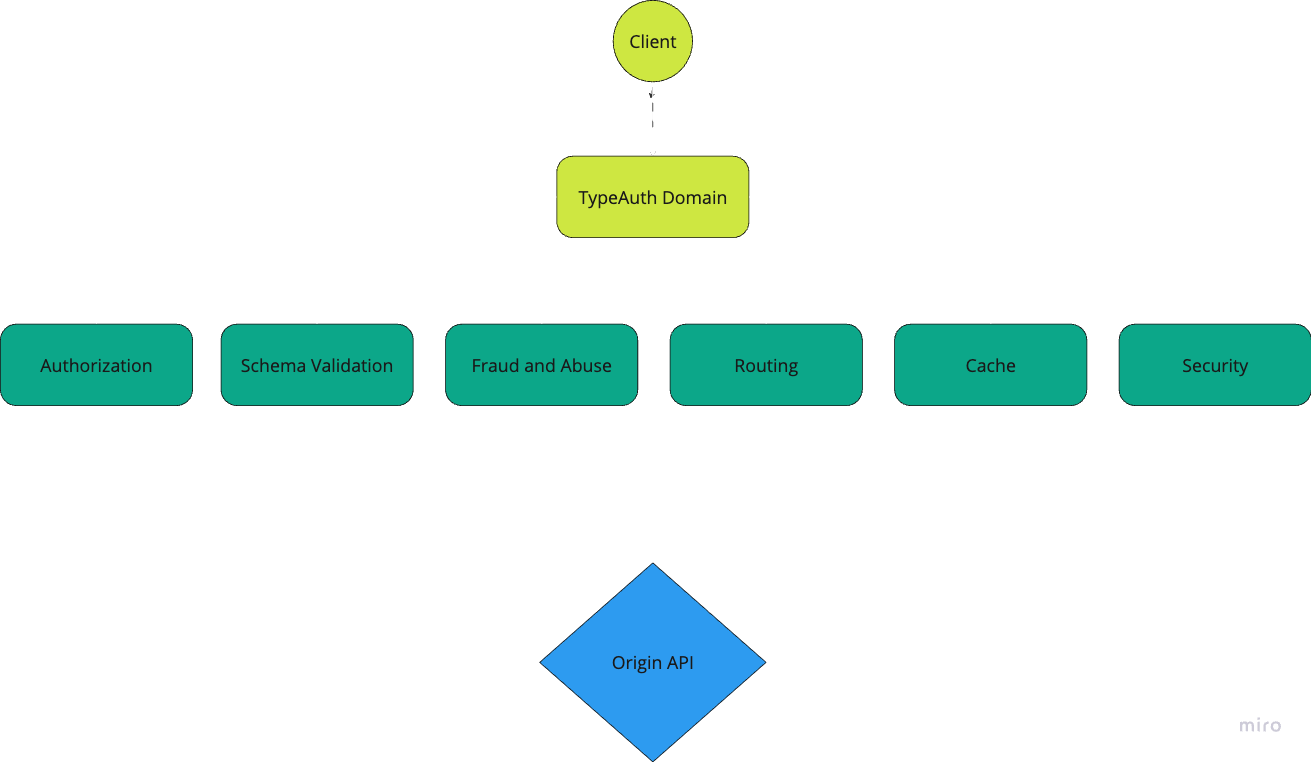
Applications are the cornerstone of TypeAuth's architecture. They serve as the primary configuration point where you define how your API traffic should be handled, secured, and routed.
## Basic Configuration
Every TypeAuth application requires these fundamental settings:
### Core Settings
* **Name**: Unique identifier for your application
* **Origin Hostname**: The destination where TypeAuth forwards traffic (e.g., `api.yourcompany.com`)
* **Domain**: Your TypeAuth-provided domain for client access
* Format: `api1-{account_slug}-proxy.typeauth.com`
* Example: `api1-acme-proxy.typeauth.com`
* **Auth ID**: Authentication profile ID
### Creating an Application
#### Via Dashboard
1. Navigate to Applications
2. Click "Create New Application"
3. Fill in the required settings
4. Save configuration
#### [Via API](https://docs.typeauth.com/api-reference/applications/create-a-new-application)
```http theme={null}
POST /{account_id}/applications/create
Content-Type: application/json
{
"name": "payment-api",
"origin_hostname": "api.paymentservice.com",
"description": "Production API in AWS"
"domain": "payments-123456789.typeauth.com"
"tags": [
"customer1", "production"]
"auth_id": "123456789"
}
```
## Profile Attachments
Applications can be enhanced by attaching various profiles:
### Available Profiles
1. **Authentication Profiles**
* API Key validation
* JWT validation settings
* Token Rate limiting
* Expiration
2. **Routing Profiles**
* URL transformation rules
* Path modifications
* Header management
3. **Fraud & Abuse Profiles**
* Rate limiting rules
* Threat detection
4. **LLM (Language Model) Profiles**
* AI content filtering
* Prompt injection protection
* Response validation
5. **Schema Validation Profiles**
* Upload a OpenAPIv3 schema
* Allow/deny traffic based on that schema
### Attaching Profiles
#### Via Dashboard
1. Select your application
2. Navigate to desired profile section
3. Choose profile to attach
4. Save changes
#### [Via API](https://docs.typeauth.com/api-reference/applications/update-application)
```http theme={null}
PATCH /{account_id}/applications/{application_id}
Content-Type: application/json
{
"auth_id": "auth-prof-123",
"abuse_id": "route-prof-456",
"routing_id": "fraud-prof-789",
"llmcache_id": "llm-prof-012",
"schema_id": "schema-652"
}
```
## Application Architecture
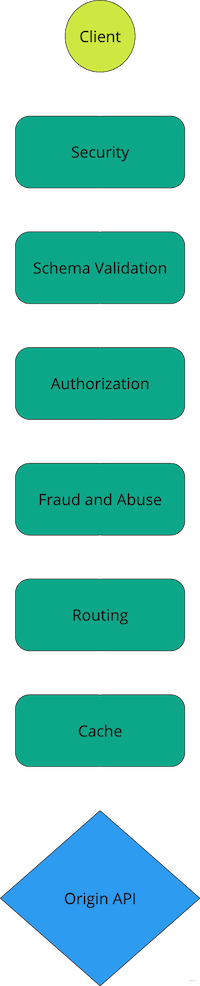
 ## Order of operations
 ## Best Practices
1. **Profile Organization**
* Create separate profiles for different environments
* Use consistent naming conventions
* Document profile purposes
2. **Security**
* Always attach authentication profiles
* Configure fraud protection for public APIs
* Regularly review security settings
3. **Maintenance**
* Regularly review attached profiles
* Remove unused profile attachments
* Keep profile configurations up to date
## Monitoring
* **Traffic Overview**: Monitor request patterns
* **Profile Performance**: Track profile effectiveness
* **Error Rates**: Monitor rejection rates
* **Latency Impact**: Track processing overhead
## Limitations
* Maximum 50 applications per account
* Up to 3 tags per application
* One profile of each type per application
* Domain name character limit: 40
## Need Help?
For assistance with application configuration or profile management, please contact our support team or refer to our API documentation for detailed examples.
## Best Practices
1. **Profile Organization**
* Create separate profiles for different environments
* Use consistent naming conventions
* Document profile purposes
2. **Security**
* Always attach authentication profiles
* Configure fraud protection for public APIs
* Regularly review security settings
3. **Maintenance**
* Regularly review attached profiles
* Remove unused profile attachments
* Keep profile configurations up to date
## Monitoring
* **Traffic Overview**: Monitor request patterns
* **Profile Performance**: Track profile effectiveness
* **Error Rates**: Monitor rejection rates
* **Latency Impact**: Track processing overhead
## Limitations
* Maximum 50 applications per account
* Up to 3 tags per application
* One profile of each type per application
* Domain name character limit: 40
## Need Help?
For assistance with application configuration or profile management, please contact our support team or refer to our API documentation for detailed examples.